Example 7: RVT Peak Calculators
Use RVT input motion with:
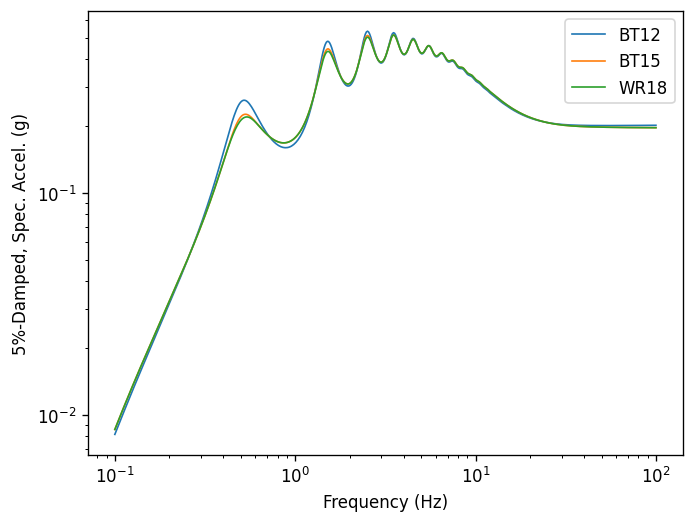
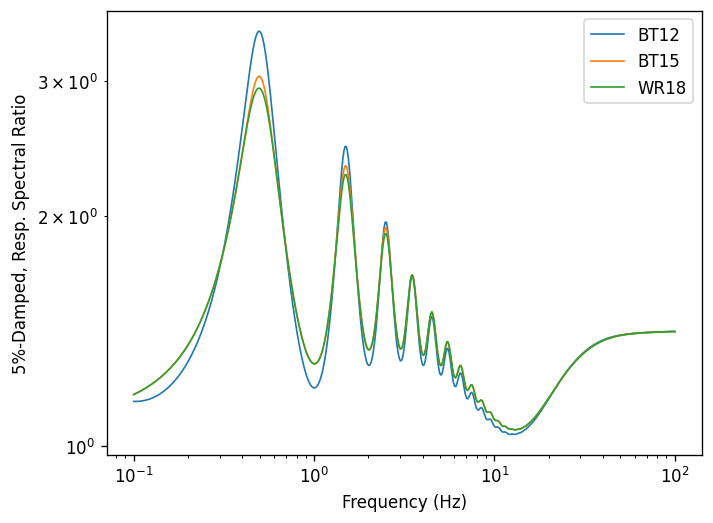
Boore & Thompson (2012) – based on Cartwright and Longuet-Higgins (56) peak factor with corrections for oscillator duration
Boore & Thompson (2015) – based on Vanmarcke (75) peak factor with corrections for oscillator duration
Wang & Rathje (2018) – based on Vanmarcke (75) peak factor with corrections for oscillator duration and site transfer function
[1]:
import matplotlib.pyplot as plt
import numpy as np

import pystrata

%matplotlib inline
[2]:
# Increased figure sizes
plt.rcParams["figure.dpi"] = 120
Create a point source theory RVT motion
[3]:
def create_motion(calculator):
    mag = 7.0
    dist = 30.0
    region = "wna"
    m = pystrata.motion.SourceTheoryRvtMotion(
        mag,
        dist,
        region,
        peak_calculator=calculator,
        # These calculators need to know about the event for the RMS duration correction
        calc_kwds={
            "region": region,
            "mag": mag,
            "dist": dist,
        },
    )
    return m


calculator_names = ["BT12", "BT15", "WR18"]
motions = [create_motion(cn) for cn in calculator_names]
[4]:
for m in motions:
    m.calc_fourier_amps()
Create site profile
Create a simple soil profile with a single soil layer with nonlinear properties defined by the Darendeli nonlinear model.
[5]:
profile = pystrata.site.Profile(
    [
        pystrata.site.Layer(pystrata.site.SoilType("Soil", 18.0, None, 0.02), 300, 600),
        pystrata.site.Layer(pystrata.site.SoilType("Rock", 24.0, None, 0.01), 0, 2000),
    ]
)
Create the site response calculator
[6]:
calc = pystrata.propagation.LinearElasticCalculator()
Specify the output
[7]:
freqs = np.logspace(-1, 2, num=500)
outputs = pystrata.output.OutputCollection(
    [
        pystrata.output.ResponseSpectrumOutput(
            # Frequency
            freqs,
            # Location out (numerator)
            pystrata.output.OutputLocation("outcrop", index=0),
            # Damping
            0.05,
        ),
        pystrata.output.ResponseSpectrumRatioOutput(
            # Frequency
            freqs,
            # Location in (denominator),
            pystrata.output.OutputLocation("outcrop", index=-1),
            # Location out (numerator)
            pystrata.output.OutputLocation("outcrop", index=0),
            # Damping
            0.05,
        ),
    ]
)
Perform the calculation
Compute the response of the site, and store the state within the calculation object. Use the calculator, to compute the outputs.
[8]:
for m in motions:
    calc(m, profile, profile.location("outcrop", index=-1))
    outputs(calc, m.peak_calculator.ABBREV)
Plot the outputs
Create a few plots of the output.
[9]:
for o in outputs:
    o.plot(style="indiv")